My Thoughts on Typekit

Written on May 13, 2010 by Andy No Comments »

As long as I’ve been designing, one of the biggest gripes Web Designers have (other than Internet Explorer) is the limited stack of web-safe fonts. What we mean by web-safe fonts are fonts that are installed on a very high percentage of visitors Operating System. Web-safe fonts (Georgia, Arial, Verdana) work well, and are nice to show to the guests visiting a site designed by you.

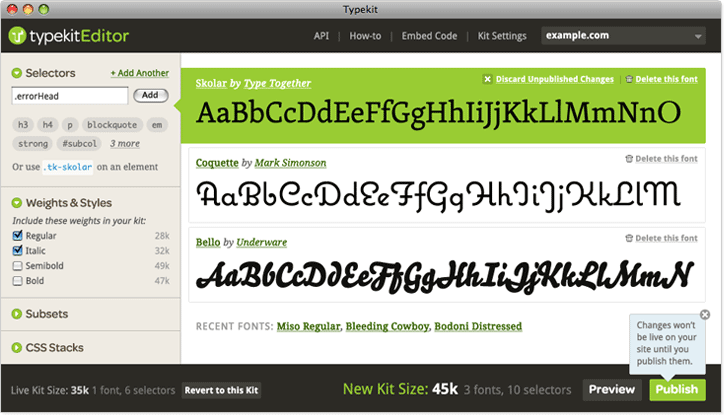
Typekit Screenshot

Typography is much of what web design is today. Having the ability to let designers be a bit more creative with font choices is a huge sell to any designer. This is where Typekit comes in and saves the day. Typekit replaces web-safe fonts with what would normally be non-safe fonts to use in peoples designs, while maintaining the ability for people to interact with the font like a normal font would (copy, paste, enlarge). There are some other options such as SIFr and Cufon but these use either flash, heavy javascript crunching, or allow people to download (and use) licence restricted fonts. Typekit instead uses @font-face, which will allow you to privately use fonts, by linking the browser to the font files on the typekit servers. This makes the fonts just like any other web-safe embedded font online. Typekit also has a increasing number of font foundries who they work with to allow you to legally use their fonts on your sites. This alone is a huge plus for the Typekit setup.

Typekit has 4 different stages of membership, each with added benefits, different amounts of fonts included, and pageview limits. While it may be considered pricey to some, for a year it is cheaper than a video game, which when put into context of more typography control is easily worth the money to me.

The best part about Typekit and @font-face is that this works in IE6+, Firefox 3.5+, Safari 3.1+ and Chrome 4.0.294+. The only major browser that it doesn’t support is Opera, but heres another great thing; graceful degradation. Typekit will allow you to use their fonts right in your CSS’s font stacks, so if it is not enabled on the browser the guest is viewing the site on you can still have a web-safe font show up easily.

So here is what I think of it. Overall, a great service at a rate that is quite good when you consider some of the font foundries you’re getting to use, and the typekit servers speed from what I’ve been seeing. There are only a few negatives that I think are even worth writing about. First and foremost is the added load to the page. Fonts are linked via your browser, and depending on the font it can be from 10k-50k per font. This may seem like a lot, but thinking of it as images, that is 1-3 larger images on a page, not something I’d say is a deal-breaker. The other negative that I see is many fonts aren’t good for use at small sizes. This is to be expected, and typekit even has some suggestions for type used in paragraphs and lower sizes.

P.S. – If you’re on a supported browser, the font you’re reading is a typekit font (FF Tisa Web Pro). Headings are also a typekit font (Adelle)


Buffalo WordPress Users Meetup #3

Written on January 19, 2010 by Andy No Comments »

We’d like to know what everything thinks about getting a wordcamp out here. Right now we’re gauging interest for how many people we’d be able to get. If you’ve never been to a wordcamp or heard of one, you can check out http://central.wordcamp.org… Also, if there are any other wordpress related questions anyone has you can post them here and we can talk about them at the meetup.

To RSVP Head over to our meetup group and join in.
Buffalo WordPress Users Meetup Group

We’re looking for anyone at any skill level with wordpress. Whether you’re a newbie or been working with it since its beginning you’re more than welcome to join in.


Android Applications for Web Designers

Written on December 14, 2009 by Andy No Comments »

android-logo

If you’re like me and one of the select few web designers and/or developers who doesn’t carry around an iPhone all day long I’d first off like to welcome you to our exclusive club. Secondly I’d like to point you to the Motorola Droid or other Android Phones (preferably the 2.0 android phones coming out soon). Its rare that a Web Designer isn’t an iPhone owner, but I have my reasonings, one large one is the network carrying the iPhone and its horrible service around Buffalo.

Anyways, No worries, because I’m in love with my Motorola Droid anyways. I’ve owned both, and personally recommend the Droid over the iPhone. One place where it does need some work is to get some more Web Design & Development Apps in the Marketplace. This is what I’ve found to be useful to me as a designer, I’ll keep this updated as new apps come out for the android platform.

  • Google Voice

    (free)
    If you’re a designer and don’t have Google Voice, this one might not help you too much, but I love this application. This is one of the “iDon’t” apps that the iPhone can’t use because of Apple’s App Store Restrictions. Anyways, It’ll let you sync your Google Voice account to your phone and even allow you to choose to make calls from your Google Voice Number all the time, internationally, or let you choose before each call. I find this great as my Business Phone Number is a Google Voice Number and being able to use my physical phone to call from that number is a great feature and one of the big selling points of this phone to me. If you don’t yet have a Google Voice account, let me know and If I’ve got any invites I’ll send one your way.

  • CSS Cheat Sheet

    (free)
    This is a simple, yet handy cheat sheet that has CSS Elements that are in a dropdown category system for quick and easy navigation and searching.

  • Remember The Milk

    (free – requires RTM Pro Account)
    Remember The Milk is one of the fastest and easiest to use task lists on mobile devices. The Pro Account for Remember the Milk is only $25.00 and if it saves you even a few hours in time you’d otherwise not have organized it has already done its job.

  • Google Analytics for Android

    (free or paid)
    There are literally a ton of Google Analytics Apps in the Marketplace for you to choose from, but I do suggest grabbing one that you enjoy. I’ve yet to test them all, so if you’ve got suggestions as to what GA apps are the best don’t hesitate to let everyone know in the comments.

  • wpToGo

    (free)
    This is another App that is for a specific piece of software, but this is one of the most popular CMS/Blogging Platforms in the world. wpToGo is a fast and easy way to connect to your WordPress Blog via mobile and add posts. There are some features I’d like to see added in either a paid version, or updated free version but this is still a very good app so far.

  • Mind Map Memo

    (free)
    Mind Map Memo is a free app that lets you easily create mind maps while on your android device. It works quite well with my Droid and makes what would seem to be a tedious process on a mobile device quite simple and powerful. I love to use mind-mapping software to organize my thoughts and ideas so this is a must have for me.

One thing that I do really enjoy is the Google Calendar that comes installed on the Motorola Droid. I won’t list that since its a common thing for most Android phones.

I’ll be updating this as more apps become available or I discover some that I have yet to run across. If you’ve got any apps that help you out with your design or management add a comment and I’ll check them out and possibly add them to the list.


Meet Andy at Wordcamp NYC

Written on October 24, 2009 by Andy 1 Comment »

I’ve got some exciting news; I’ll be attending my first ever Wordcamp on November 14th and 15th in NYC. Very excited to go to one and have been trying to get to one for a couple years now. As most of our clients know we almost always suggest wordpress as a CMS or blog for our sites because it is so flexible, powerful and open source. If you’re going and would like to meet just let me know as I’m looking to network with as many people as I can during the event.

WordCampNYC – Nov 14-15

More information on Wordcamp NYC


We’ve given ourselves a Facelift

Written on August 6, 2009 by Andy No Comments »

It took a while, but we just gave ourselves a nice new design for the site. We’re still working on some small details, so you might see some areas that are still being worked on so pardon our dust. We hope everyone likes the new design.


IPB 3.0 and vBulletin 4.0 Theme Design

Written on July 3, 2009 by Andy 1 Comment »

I’m happy to announce that I will begin designing for IPB 3.0+ and vBulletin 4.0+. vBulletin 4.0 is planned to release sometime in August, and IPB has just been released. If you’re looking for a custom IPB or vB skin don’t hesitate to contact me and I can help you out. 15% discount to the first 5 clients on the new forum designs!

I’m also thinking about releasing some downloadable themes (haven’t decided for sure, or whether they’ll be paid or free), but I will keep everyone updated of releases of themes if and when I do.


Using a Pen and Paper as a Web Designer

Written on May 18, 2009 by Andy No Comments »

Since starting as a Freelance Designer over 3 years ago I’ve matured quite a bit in my designs, and how I manage to create the designs. From thoughts in my head to html/css code displayed in a browser as a finished product, each step along the way is crucial to a good design, and one of the areas that I often undervalued when designing before was wire framing phase.

Wire frames are gaining popularity very fast with designers and after trying it out, theres no question why. Wire frames help to organize all the information and sections of a site that you’re working on. (more…)


Website Design and New Techniques

Written on April 18, 2009 by Andy No Comments »

Lorem ipsum dolor sit amet, consectetuer adipiscing elit. Proin sed odio et ante adipiscing lobortis. Quisque eleifend, arcu a dictum varius, risus neque venenatis arcu. Quisque eleifend, arcu a dictum varius, risus neque venenatis arcu, a semper massa mi eget ipsum. Proin sed odio et ante adipiscing lobortis.

Proin sed odio et ante adipiscing lobortis. Lorem ipsum dolor sit amet, consectetuer adipiscing elit. Proin sed odio et ante adipiscing lobortis. Quisque eleifend, arcu a dictum varius, risus neque venenatis arcu, a semper massa mi eget ipsum. Proin sed odio et ante adipiscing lobortis.

(more…)


Web Design For Beginners

Written on April 17, 2009 by Andy No Comments »

Quisque eleifend, arcu a dictum v1arius, risus neque venenatis arcu, a semper massa. Quisque eleifend, arcu a dictum v1arius, risus neque venenatis arcu, a semper massa. Quisque eleifend, arcu a dictum v1arius, risus neque venenatis arcu, a semper massa. Quisque eleifend, arcu a dictum v1arius, risus neque venenatis arcu.

  • This would be point 1
  • And maybe point two here
  • Most importantly, point three

Aliquam id lorem a orci consequat sodales. Nunc magna ante, suscipit eget, lobortis ut, sollicitudin sed, eros. Nam eget augue.

(more…)


FBodyOnline Wins vBulletin.org BOTM

Written on April 2, 2009 by Andy 1 Comment »

I’m happy to announce that my Camaro Forum has won vBulletin.org’s Board Of The Month Contest.

F-Body Online

I had some stiff competition, but I’m quite happy with the win and hope to continue to improve the forum and keep our member base growing and consistent.

vBulletin BOTM